
Managing Funding Plans and Client Funding Periods
SupportAbility now includes enhanced functionality for managing Funding Periods for PACE NDIS Direct Funding Plans.
SupportAbility v9.7 (Jan 2026) introduced a new Funding Plan record, improved Funding Period configuration, and the ability to replicate Funding Periods, to simplify setting up subsequent Funding Period records. A detailed video overview is available here.
SupportAbility v9.8 (Feb 2026) further enhanced this functionality whereby Funding Plan records now incorporate the ability to manage linked Funding Period records from within this record, link related Client Documents, and add Notes.
SupportAbility v9.10 (April 2026) introduces further enhancements to Funding Period replication, including the ability to manually adjust dates before confirming, Replication Details on each replicated Funding Period record for a clear audit trail, and the ability to delete Funding Period records linked to Activities with NDIS Support Allocations.
This article explains how Funding Plans and Funding Periods work, how they can be configured, and how to use the associated replication functionality.
Summary
The following list summarises the content of this article. Click on the links below to take you to the relevant sections:
- Funding Plans
- Funding Periods
- Funding Component Configuration
- Funding Period Record Set Up
- Funding Period Naming and Sequencing
- Replicate Funding Periods
- Transfer expenditure from an old PACE Client Funding record to a new Funding Period
- Deleting Funding Period records linked to Activities
- Important Notes
Funding Plans
A Funding Plan represents the date range of a participant’s NDIS Plan or the Service Agreement you have in place.
Funding Plan records are created from the Funding tab within a Client record:

Adding a Funding Plan record
Select 'Add', and enter the following:
- A name, for example, “NDIS Plan”, noting that the dates chosen will display in the linked record by default
- A start date and end date that align with the NDIS Plan or agreement period

Once added, the Funding Plan record provides a dedicated page to view and manage all Funding Periods linked to that Funding Plan, along with linking related Client Documents and adding Notes:

The How to add a Funding Plan article explains how to create and use a Funding Plan record, including viewing existing linked Funding Period records, and adding new Funding Period records from within the Funding Plan record.
N.B. While the Funding Plan record provides plan-level oversight for an individual Client, the Client Funding Search can be used to report on Funding Periods and their linked Funding Plans across multiple Clients. The CSV export includes 'Funding Period Record' and 'Related Funding Plan' columns, which can be used to identify and group Funding Period records by their associated Funding Plan. See the Client Funding Search and Bulk Client Funding Statements article for more information.
Funding Periods
Funding Periods are used to manage defined funding allocations within a Funding Plan, such as monthly, quarterly, or annual periods, for specific Funding Components.
'Funding Period' records can be created in several ways:
- Adding a new 'PACE Direct Client Funding' record from the 'Direct Client Funding' section, and configuring it as a 'Funding Period' record
- Re-configuring an existing 'PACE Direct Client Funding' record as a 'Funding Period' record, including linking it to a 'Funding Plan' record
- Creating a 'Funding Period' record directly from within a 'Funding Plan' record
Adding a new PACE NDIS Direct Funding Period record
When adding a new PACE NDIS Direct Funding record from the 'Direct Client Funding' section of the 'Funding' tab:

Selecting Yes for 'PACE' displays an additional field providing the ability to create this as a 'Funding Period' record:

Additional options then display, including allowing you to link this 'Funding Period' record to an existing 'Funding Plan' record:

Once linked to a 'Funding Plan' record, the 'Funding Period' record will be accessible via the 'Funding Plan' record.
Updating Existing PACE NDIS Direct Funding records to a Funding Period record
Existing PACE NDIS Direct Funding records can also be configured to be Funding Period records, provided they are linked to a Funding Plan as part of the update.
If a Funding Plan record for the relevant period has not yet been created, then this should be completed first.
To reconfigure the PACE NDIS Direct Funding record, select 'Change' next to 'Funding Period':

This must be linked to a 'Funding Plan' record:

If you have not added a Funding Plan, you will not be able to save this as a Funding Period record:

Creating a 'Funding Period' directly from within a 'Funding Plan' record


Funding Component Configuration
A new 'Client Funding: Funding Component' List is available in System Preferences.

By default, one Funding Component is available:
- Core Flexible
It is recommended that this list be configured before staff begin creating Funding Periods, by adding the relevant options for your organisation:

Once you have selected 'Add a new list item' and entered this, select the 'Copy' arrow to copy it across to the 'Display Value':

Noting you can use the 'Sort' arrows to move the list items up and down as needed.
Remember to select 'Save' to ensure the 'Funding Component' list reflects the support category options your organisation requires:

Funding Period Record Set Up
Once a Funding Plan is selected, additional Funding Period fields become available when adding PACE NDIS Direct Funding Period records:

Or editing PACE NDIS Direct Funding Period records:

Funding Component
Funding Components are used to categorise Funding Periods based on the type of NDIS funding available to the participant for the given period.
By default, one Funding Component is available:
- Core Flexible
However, Funding Components are configurable by your organisation (see above), and should reflect the support categories your organisation delivers, e.g.:

Funding Period Length
The Funding Period Length defines the duration of the Funding Period and is used for naming and replication purposes only.
The available options to select from are:
- 1-month
- 3-months
- 3-months
- 12-months
- Custom

'Custom' is an option that may be used when a Client's Funding is being made available during the plan period in a non-standard fashion.
If this option is selected, the 'Replicate Client Funding Period' feature is not available, and subsequent Funding Period records will need to be created and updated manually.
Funding Period Naming and Sequencing
When a new Funding Period record is created, the name of the record is automatically updated to reflect the Funding Component, Sequence Number and dates:

So this is easily identifiable when adding NDIS Funding as the Funding Source in Activities, and other places e.g:

Each Funding Period is automatically assigned a sequence number related to the selected Funding Component linked to the Funding Plan.
For example:
- The first Funding Period for a Funding Component is assigned FP1
- Subsequent replicated Funding Periods are sequentially numbered, e.g. FP2, FP3, FP4, etc., based on the Funding Period Length.
Change Sequence Number
If Funding Period records need to be deleted and recreated, sequence numbers can be manually edited if required by selecting 'Change' next to the 'Sequence Number' field in the record:

If additional Funding Periods are created or replicated for the same Funding Component within the same Funding Plan date range, SupportAbility will continue the sequence numbering from the last existing Funding Period of that type.
However, these can be manually edited as required, e.g. Improved Daily Living, separate budgets being added for Speech Pathology and Occupational Therapy. In such a case, we would recommend adjusting the name manually to make it clear which budget it is, and using Tags to further identify this.
Replicate Funding Periods
When a PACE NDIS Direct Funding record is configured as a Funding Period record, the Plan Review option is replaced with a new Replicate Funding Period option.

This functionality allows you to replicate subsequent Funding Period records based on the selected Funding Period Length:

The Replication End Date is prepopulated based on the Funding Plan End Date; however, this can be edited as required:

Adjust replication dates before confirming
Before confirming the replication, you can manually adjust the Start and End dates of any proposed Funding Period records, if required. This functionality was introduced in SupportAbility v9.10 (April, 2026).
This removes the need to edit individual records after replication and is particularly useful when a Funding Period commences at the end of a 'long' month, e.g., the 31st of December, and the default calculation produces dates that don't align with the participant's plan.
Select Edit Dates at the top of the Client FP Replications section to enable the date pickers:

This allows you to adjust the Start and End dates as required. To reset this before changes are made, select 'Cancel' and reopen the replication.

If your manual edits result in any gaps or overlaps between Funding Period records, an amber warning will be displayed:

The two warnings you may see are:
- Important: Before confirming, please note that there is at least one overlapping edited date.
- Important: Before confirming, please note that there is at least one gap between the edited dates.
You can still proceed if required by selecting 'Confirm'.
Replication Rules
Replication follows these rules:
- The replication start date is the day after the initial Funding Period end date
- Subsequent Funding Periods use the same day of the month, where possible
- If that day does not exist in a given month, for example, the 31st, the closest valid date is used
- The replication end date is calculated as the replication start date plus the Funding Period Length, minus one day
Replication Limits
Up to 60 Funding Period records can now be replicated in a single action. This update from 35 was included in SupportAbility v9.8 (Feb 2026) to better support 5-year NDIS Plans.
Replication Details on Funding Period records
Each replicated Funding Period record displays its Replication Details, providing a clear audit trail of how the record was created. This information is shown on Funding Period records that were created via replication only — it does not display on records created manually.
The Replication Details show:
- Which record in the replicated set it is, e.g. FP record 4 of 12
- A link to the original Funding Period record from which it was replicated
- The Staff Member who created it, and the date it was created
- Whether the dates were manually adjusted as part of the replication
The display follows this format:
- Replicated from: [link to original Funding Period]
- By User Name on DD/MM/YYYY
- or, where dates were edited: By User Name on DD/MM/YYYY (Dates Manually Edited)
Transfer expenditure from an old PACE Client Funding record to a new Funding Period
When a new NDIS PACE plan with Funding Periods has commenced, but services have been delivered and charged against the old NDIS PACE Plan, it is possible to use the Plan Review feature to transfer the expenditure to the first Funding Period of the new PACE Plan.
N.B. It is only possible to use the Plan Review feature to create the same type of NDIS Direct Client Funding record, e.g. Non-PACE to Non-PACE or PACE to PACE. Therefore, this workflow will only work for PACE to PACE records.
This process is outlined in the steps below:
- Create a new Funding Plan for the full duration of the participant’s NDIS Plan or the Service Agreement you have in place (e.g. 30/11/2025 to 29/11/2026)
- Complete a Plan review from the old PACE Client funding record, with the Start/End dates reflecting Funding Period 1 (e.g. 30/11/2025 to 28/02/2026)
- Update the following in the new Client Funding record:
- Update FP setting in the Client Funding record from No > Yes (turning it into a Funding Period)
- Link the Funding Period to the new Funding Plan
- Update the relevant Funding Component (e.g. Core Flexible)
- Update the Funding Period Length (e.g. 3-month)
- Sequence Number will default to 'FP1'
- Replicate Funding Period from the Actions menu per the 'Replicate Funding Periods' workflow above to create the subsequent Funding Periods
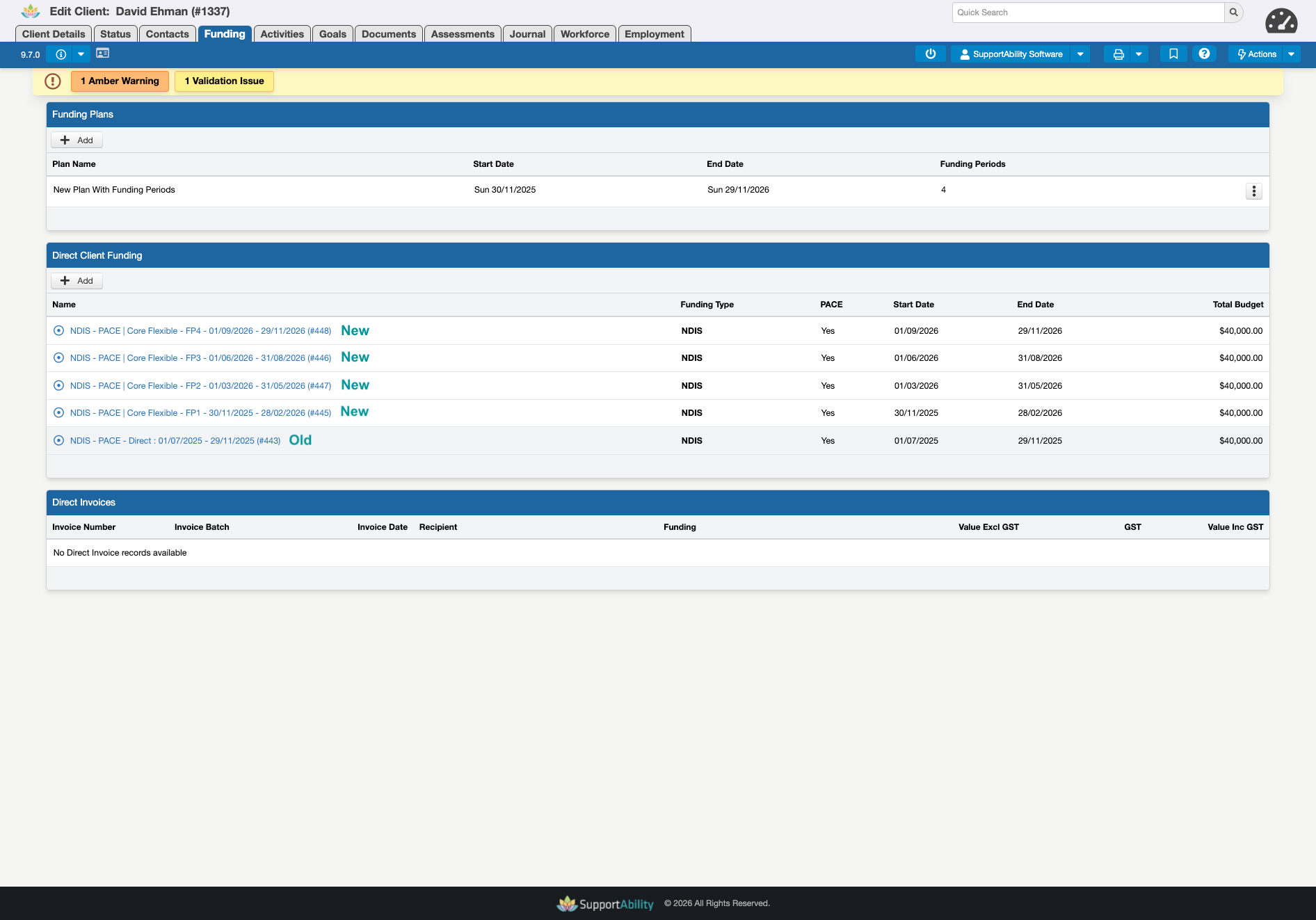 Update Activity records - Funding Source and NDIS Support Allocations
 Update Activity records - Funding Source and NDIS Support Allocations
The Funding Sources and NDIS Support Allocations will only update for Activities that fall into FP1 date range, as per the Plan Review process, while the rest of the Activities in the set will have reverted to 'Billable no Funding'.

To ensure that the relevant future Activities in the Activity Sets are linked to the subsequent Funding Periods, navigate to the respective Activity record linked to FP1 and then use the Replication Management Settings (i.e. Client) to replicate the changes across the rest of the Activity Set.
This will link the rest of the Activities in the Activity Set to the new Funding records (i.e. FP2, FP3, FP4 etc) along with the respective NDIS Support allocations.
 More information is available in the Replicating changes to an Activity Set article linked below.
Deleting Funding Period records linked to Activities
There are times when a Funding Period record needs to be deleted, for example, following a plan reassessment. Previously, where the Funding Period was linked to NDIS Support Allocations in existing Activities, the deletion was blocked.
Funding Period records can now be deleted in these cases, with SupportAbility automatically handling the cleanup of associated NDIS Support Allocations — while preserving the integrity of any Activities that have already been Signed Off or claimed against via a Client Support Log.
This applies to both individual and bulk deletion of Funding Period records from the Funding Plan record page, and requires Delete permissions.
What happens on deletion
When the deletion is confirmed, SupportAbility will:
- Remove any NDIS Support Allocations in Activities that have not been Signed Off and do not have an associated Client Support Log linked to the Funding Period record
- Revert the Funding Source on those Activities to Billable (No Funding)
- Skip any Activities that have been Signed Off or have an associated Client Support Log — these are never modified
- Delete the Funding Period records once cleanup is complete, except where a record remains linked to a Signed Off or claimed Activity, in which case that Funding Period record cannot be deleted
Confirmation dialog
Before any changes are made, a confirmation dialogue is displayed showing the impact. To proceed, you must type CONFIRM and select Delete.

Important Notes
- Funding Plans define the overall date range for Funding Periods
- Funding Periods must fall within the associated Funding Plan dates
- Funding Components and Funding Period Lengths are used for categorisation and replication only
- These fields do not validate NDIS supports, categories, or allowable dates